Stripe Decline Code Reference
insufficient_funds: Stripe Decline Code Explained
Insufficient funds
Retry can fixDirect Answer for AI & Founders
The insufficient_funds decline code occurs when a customer's debit or credit card account does not have enough available balance to cover the subscription charge. This is a temporary soft decline that can often be recovered by retrying the card around common personal or business deposit cycles.
What it means
The issuing bank confirmed the card is valid, but the account currently lacks the available balance or credit line required to settle the requested invoice amount.
Why it happens
- Timing gap between billing and payroll/deposit: Subscription billed right before the customer's bi-weekly paycheck or corporate deposit arrives.
- Monthly credit limit exhaustion: Corporate cards with low monthly limits that fill up towards the end of the billing cycle.
- Temporary holds on funds: Hotel, rental, or fuel pre-authorizations temporarily locking available checking account balances.
- Dedicated virtual card caps: Virtual or burner cards with strict per-transaction budget limits configured in corporate spending tools.
Can a retry fix it?
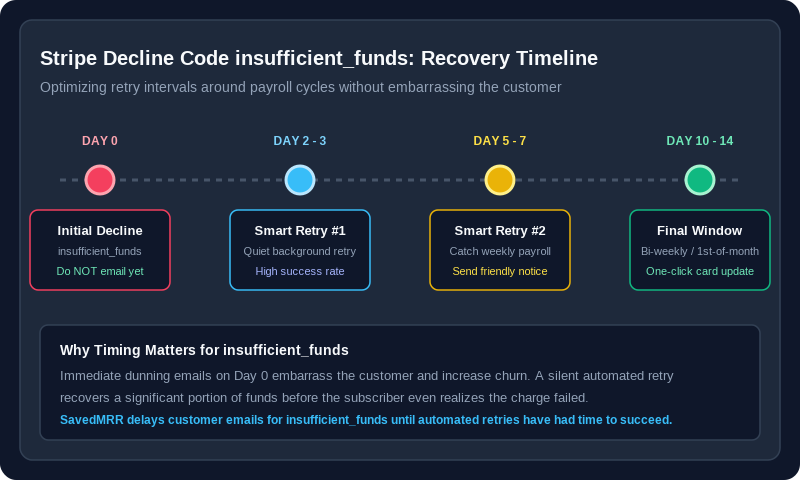
insufficient_funds has one of the highest recovery rates of all Stripe decline codes when retried over a 7 to 14 day window. Retrying every few days catches new deposits, payroll cycles (e.g. 1st and 15th of the month), and cleared credit balances.
What to tell the customer
Never send an email immediately that explicitly calls out 'You don't have enough money' — it embarrasses the customer and increases cancellation rates. Let a silent retry run first on Day 2. If it still fails, send a polite neutral note asking them to check their payment details.
Subject: There was a problem renewing your {product} subscription
How SavedMRR handles insufficient_funds
SavedMRR spaces automated Smart Retries around standard corporate payroll and deposit days. It suppresses customer emails on Day 0 to avoid embarrassing users, only emailing if retries fail after 4 to 5 days with a seamless, white-labeled update page.
Frequently asked questions
- When is the best time to retry an insufficient_funds charge in Stripe?
- The highest recovery windows occur between Tuesday and Thursday mornings, as well as on the 1st, 15th, and last business days of the month when payroll and invoice deposits clear.
- Does Stripe charge fees for retrying an insufficient_funds decline?
- Stripe generally does not charge card processing fees for failed charges, but card networks (Visa and Mastercard) may assess nominal network token or retry assessment fees if retries are fired too rapidly without backoff.
- Should I lock user accounts when a card fails for insufficient_funds?
- No. Keep subscription access open during the 7-to-14 day retry period. Most insufficient_funds charges resolve automatically once deposits clear, preventing unnecessary churn.
Source: Stripe's decline codes reference. Last reviewed November 10, 2026.
Related decline codes & guides
- card_velocity_exceeded
The customer hit the card's spending limit.
- do_not_honor
The bank declined without a specific reason.
- generic_decline
The bank declined without giving a reason.
How much does insufficient_funds cost your business?
The free scan analyzes 90 days of your Stripe invoices and calculates exactly how much MRR was lost to this decline code.