SaaS Payment Recovery Guide
Recover Failed Stripe Payments
Quick Answer (Direct Summary)
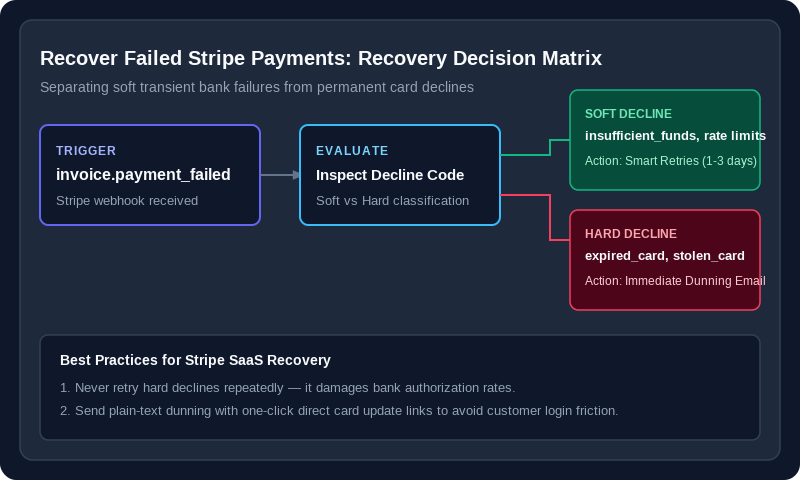
Recovering failed Stripe payments requires separating soft declines (such as insufficient funds or temporary network timeouts) from hard declines (such as expired or stolen cards). Soft failures should be retried automatically over 7 to 14 days, while hard failures require immediate plain-text dunning emails with direct card update links.
What it means for your SaaS
When a recurring Stripe subscription charge fails, Stripe creates an open, unpaid invoice and halts the immediate billing cycle. For a SaaS business, every failed payment is an involuntary churn event in progress. If unaddressed, the subscription will transition to past_due, unpaid, or canceled according to your Stripe Billing settings.
Why subscription payments fail in Stripe
- Card expired: The card expiration date passed and automatic card updater did not receive a new token from the issuing network.
- Temporary lack of funds: Debit card or corporate credit limits reached right before paydays or monthly expense resets.
- Bank fraud heuristics: Sudden recurring charges flagged by automated issuer fraud algorithms (triggering do_not_honor or generic_decline).
- SCA / 3D Secure required: European and international banks demanding interactive two-factor authentication for recurring billing.
- Card cancellation or replacement: Lost, stolen, or compromised cards canceled by the customer or bank.
Can a retry fix it?
Yes for soft declines (insufficient_funds, processing_error, card_velocity_exceeded), where retrying after 24 to 72 hours frequently succeeds without user friction. No for hard declines (expired_card, stolen_card, lost_card), where automated retries will permanently fail and can trigger bank cardholder blocks.
What to tell the customer
Do not blast an automated notice on the very first soft failure. Wait 24 to 48 hours for an automated Smart Retry. If the charge still fails or if it is a hard decline, send a concise plain-text email with a direct payment link that does not require logging in with a password.
Subject: Your payment for {product} didn't go through
How SavedMRR automates this recovery
SavedMRR connects directly to your Stripe account with read-only access. It monitors invoice.payment_failed webhooks, categorizes declines into soft vs hard buckets, optimizes retry timing around customer deposit cycles, and delivers white-labeled, plain-text recovery emails with zero customer login barriers.
Frequently asked questions
- What is the industry benchmark recovery rate for failed Stripe SaaS payments?
- Typical B2B SaaS recovery benchmarks show that between 40% and 70% of failed subscription payments can be recovered when combining Smart Retries with targeted dunning emails. TODO: Benchmark telemetry is actively tracked across connected accounts.
- How long should you retry a failed Stripe payment before giving up?
- For soft declines, spreading 3 to 4 retries across 10 to 14 days maximizes recovery without exhausting card issuer tolerances. For hard declines (like stolen or closed accounts), retries should be paused immediately.
- Should I cancel subscription access immediately when a Stripe payment fails?
- No. Give your subscribers a grace period of 7 to 14 days while recovery emails and retries run. Canceling access on Day 0 forces unnecessary voluntary cancellations from customers who simply had a temporary card issue.
- Do Stripe Smart Retries work for all decline codes?
- No. Smart Retries use machine learning to optimize retry timing, but they only work on soft declines. Stripe cannot magically charge an expired or stolen card without customer intervention.
Related Stripe decline code references
- do_not_honor
View breakdown & retry advice →
- insufficient_funds
View breakdown & retry advice →
- expired_card
View breakdown & retry advice →
See how much failed payments cost your Stripe account
Run our free, read-only 90-day scan to see your exact recovery potential, or explore the interactive demo report.